NFC API

'NFC' external object was designed to help users create applications that can interact with NFC tags. 

This feature requires a device with compatible hardware.

Compatibility: Android


Structure

This external object includes the following functions:
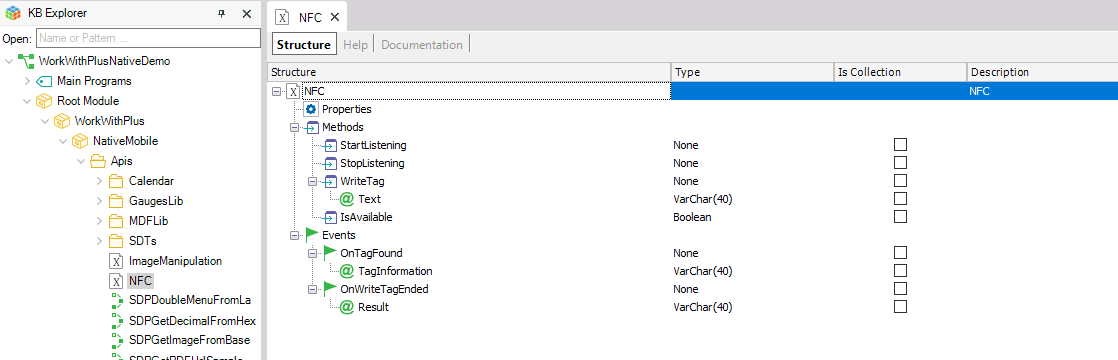
GeneXus KB Explorer and Structure view of the NFC data type under Root Module > WorkWithPlus > NativeMobile > Apis. The structure lists methods StartListening, StopListening, WriteTag (Text VarChar(40)), and IsAvailable (Boolean), plus events OnTagFound (TagInformation VarChar(40)) and OnWriteTagEnded (Result VarChar(40)).


StartListening

Starts listening for NFC tag events in the background. Users can continue executing any logic, but if the application goes to the background or a new Panel is invoked, NFC events will not be received.

After the API starts listening, if an NFC Tag is put near the device, the event 'OnTagFound' will be fired.

NFC.StartListening()


StopListening

If the API was listening in the background, this method will stop listening for NFC events. This means that if an NFC Tag is put near the device, the API will not react.

Should be called when the screen no longer needs to read tags (e.g., when leaving the screen or switching to write mode).

NFC.StopListening()


WriteTag

Starts listening for NFC tag, but on 'write' mode. This means that if an NFC Tag is put near the device, the API will try to write down the provided information in the Tag.

This will fire the 'OnWriteTagEnded' event with the result of the 'write' action, either it is successful or not.

NFC.WriteTag(&textToWrite)

The app can only be in read mode or write mode at a time, not both simultaneously.


IsAvailable  → Boolean

Checks whether the device has NFC hardware and whether it is currently enabled.

&nfcAvailable = NFC.IsAvailable()
If &nfcAvailable = False
    Msg("This device does not have NFC or it is disabled")
EndIf

Always call this before starting any NFC operation.


Available Events


OnTagFound

Fires when an NFC tag is successfully read. The TagInformation parameter contains the text stored on the tag.

Event NFC.OnTagFound(&tagInformation)
    &lastTagRead = &tagInformation
    Refresh
EndEvent

Behavior:
  • If the tag has NDEF text content, that text is returned.
  • If the tag is empty or has no text records, TagInformation arrives as an empty string "".


OnWriteTagEnded

Fires when the write operation has completed, whether successfully or with an error.

Event NFC.OnWriteTagEnded(&result)
    If &result = ""
        Msg("Tag written successfully")
    Else
        Msg("Write error: " + &result)
    EndIf
EndEvent

You can also use &result.IsEmpty()


Result parameter values:

Value Meaning
"" (empty) Write successful
"Tag not found" No tag was detected
"Tag doesn't support ndef" Tag does not support NDEF write
"Error writing Tag content" Generic write error
Other text Error message from the Android system


Content Format for Writing


The API always writes in NDEF plain text format (RTD_TEXT, UTF-8). No special formatting is needed from GeneXus — pass the text string directly.

// Correct — simple text
NFC.WriteTag("ITEM-001")

// Correct — with separators if the receiver expects them
NFC.WriteTag("ID:001|LOC:A3")

// Correct — numbers only
NFC.WriteTag("12345678")

// Correct — variable
 NFC.WriteTag(&Content)

Native URL writing (RTD_URI) is not supported. If a URL is passed as text it is stored and read back as plain text, not as a link automatically opened by the system.


Character Limits and Special Characters


Each character does not necessarily occupy 1 byte on the tag:

Character type Bytes on tag Examples
Standard ASCII 1 byte A–Za–z0–9-_:/
Accented or special characters 2 bytes á é í ó ú ñ ü Ä Ö Ü
Emoji or Asian characters 3–4 bytes 中 日 한 

In addition, the library adds a fixed 10-byte NDEF overhead per write (protocol headers, language code).


Available space by tag type
 

Tag NDEF Capacity Available for text
MIFARE Ultralight 46 bytes 36 bytes
NTAG213 144 bytes 134 bytes
NTAG215 504 bytes 494 bytes
NTAG216 888 bytes 878 bytes
MIFARE Classic 1K / 4K ~716–3440 bytes ~706–3430 bytes


Practical recommendation: Using standard ASCII characters (no accents or special letters) guarantees compatibility with all supported tags, including MIFARE Ultralight.


Tags That Require Prior NDEF Formatting


Some tags come from the factory without NDEF format (called "blank" or NdefFormatable tags). Typical examples: freshly purchased MIFARE Classic, some industrial tags.

The API handles this automatically. If the detected tag is NdefFormatable, the library formats it and writes the content in a single operation, with no intervention required from the user or the GeneXus developer. The result is delivered through OnWriteTagEnded exactly the same way.

There is no extra step for the user. Simply bringing the tag close to the device while the app is in write mode is enough.


Recommended Usage Flow


Read only

// When the screen loads
Event Start
    If NFC.IsAvailable()
        NFC.StartListening()
    EndIf
EndEvent

// When a tag is detected
Event NFC.OnTagFound(&tagInformation)
    &data = &tagInformation
    Refresh
EndEvent

// When leaving the screen
Event Back
    NFC.StopListening()
EndEvent

Write only

// User taps "Write Tag"
Event 'WriteTag'
    If NFC.IsAvailable()
        NFC.WriteTag(&textToWrite)
        Msg("Hold an NFC tag close to the device...")
    EndIf
EndEvent

// Write result
Event NFC.OnWriteTagEnded(&result)
    If &result = ""
        Msg("Written successfully")
    Else
        Msg("Error: " + &result)
    EndIf
    // Return to read mode if needed
    NFC.StartListening()
EndEvent


Supported Android versions

Android API State
Android 7.0 Nougat 24 ✅ Minimum supported
Android 7.1 25 ✅ 
Android 8.0 / 8.1 Oreo 26-27 ✅ 
Android 9 Pie 28 ✅ 
Android 10 29 ✅ 
Android 11 30 ✅ 
Android 12 / 12L 31-32 ✅ 
Android 13 33 ✅ 
Android 14 34 ✅ 
Android 15 35 ✅ 
Android 16 36 ⚠️ Beta

NFC must be enabled on the device under Settings → Connections → NFC.


Tags supported by NFC API

Technology Standard Typical tags
Ndef Generic Any tag with formatted NDEF content
NdefFormatable Generic Blank tags formattable to NDEF
NfcA (ISO 14443-3A) ISO 14443 Type A NTAG213/215/216, MIFARE Classic, Ultralight
NfcB (ISO 14443-3B) ISO 14443 Type B Bank tags, electronic ID
NfcF (JIS 6319-4) FeliCa Japanese transport cards (Suica, etc.)
NfcV (ISO 15693) Long-range RFID Industrial tags, inventory labels
IsoDep (ISO 14443-4) ISO 14443 Type A/B Payment cards, smart cards
MifareClassic NXP MIFARE Classic 1K / 4K
MifareUltralight NXP NTAG203, NTAG21x, Ultralight C


Templates

The following templates are distributed:


NFC Tag scanner

Shows an example of how to use the API to scan and show a message with the TAG information
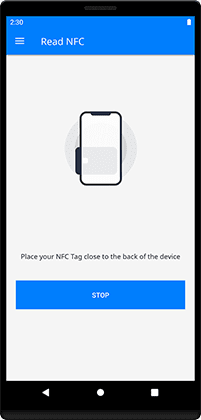
A native mobile 'Read NFC' screen shows a phone icon with an NFC tag graphic, the instruction 'Place your NFC Tag close to the back of the device', and a blue 'STOP' button to cancel the scan.  


NFC Tag writer

Shows an example of how to write content in the TAG
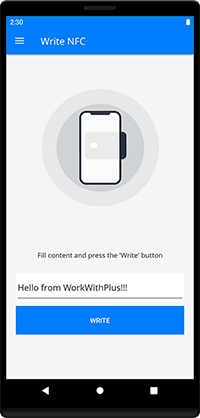
A native mobile 'Write NFC' screen shows a phone icon with a signal graphic, a text field containing 'Hello from WorkWithPlus!!!', the instruction 'Fill content and press the Write button', and a blue 'WRITE' button.