Add totalizers to the ExportReport

By default The ExportReports include all the records of the grid that we see on the screen, but in the case that in our grid we have totalizers, they are only shown from version 14, for previous versions they are not shown.

To add the totalizers in the ExportReports, the following steps must be followed.

1 - In the 'CalculateTotalizers' event we are going to add a code that saves the totalizer value in the session:

&Session.Set("CustomerWWCustomerIdTotal", &TotalValueCountryId)
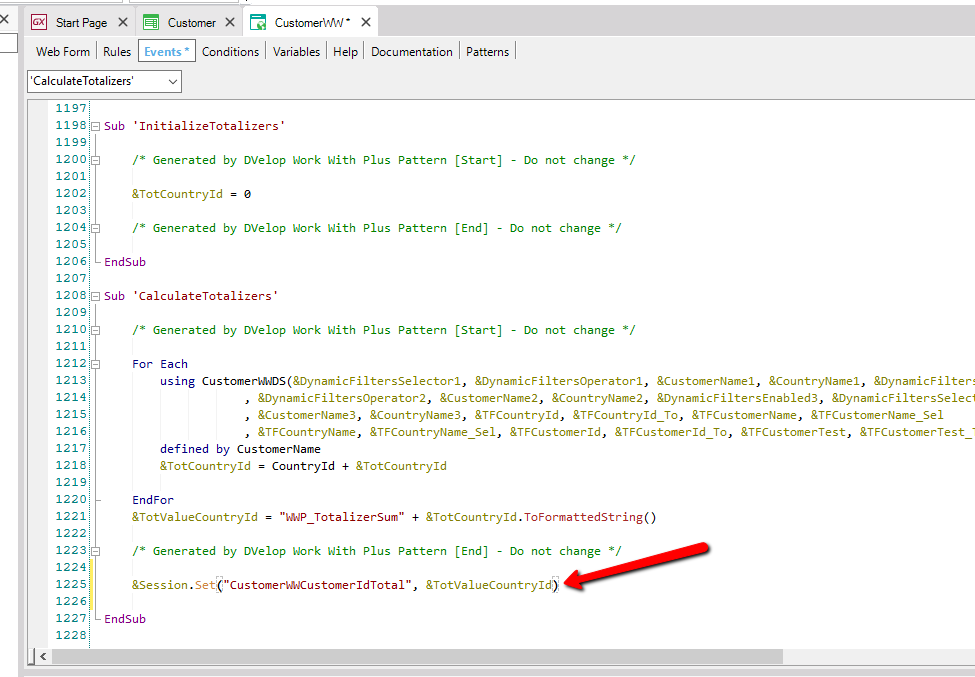
GeneXus IDE code editor open on the CustomerWW transaction Events tab, showing the CalculateTotalizers event with an InitializeTotalizers sub and a CalculateTotalizers sub containing a For Each loop over CustomerWWDS; a red arrow points to the line &Session.Set("CustomerWWCustomerIdTotal", &TotValueCountryId) at line 1225.

2 - Next, in the PDF procedure, add a Printblock called 'user_Totalizers' (print blocks that start with 'user_' are not excluded by pattern):
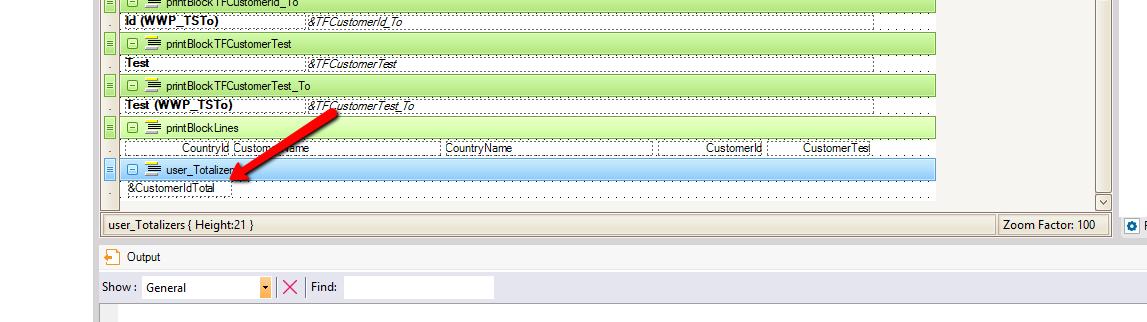
GeneXus report layout designer shows print blocks including printBlockTFCustomerId_To, printBlockTFCustomerTest, printBlockTFCustomerTest_To, and printBlockLines with CountryId, CustomerName, CountryName, CustomerId, CustomerTest columns; a red arrow points to the selected user_Totalizers block containing the &CustomerIdTotal variable, with its properties showing Height:21 and Zoom Factor 100 below.

3 - Then in the Source of the procedure we are also going to load the content of the printblock, making use of the value that we save in session, in the PDF is as follows:

&CustomerIdTotal = &Session.Get("CustomerWWCustomerIdTotal")

print user_Totalizers
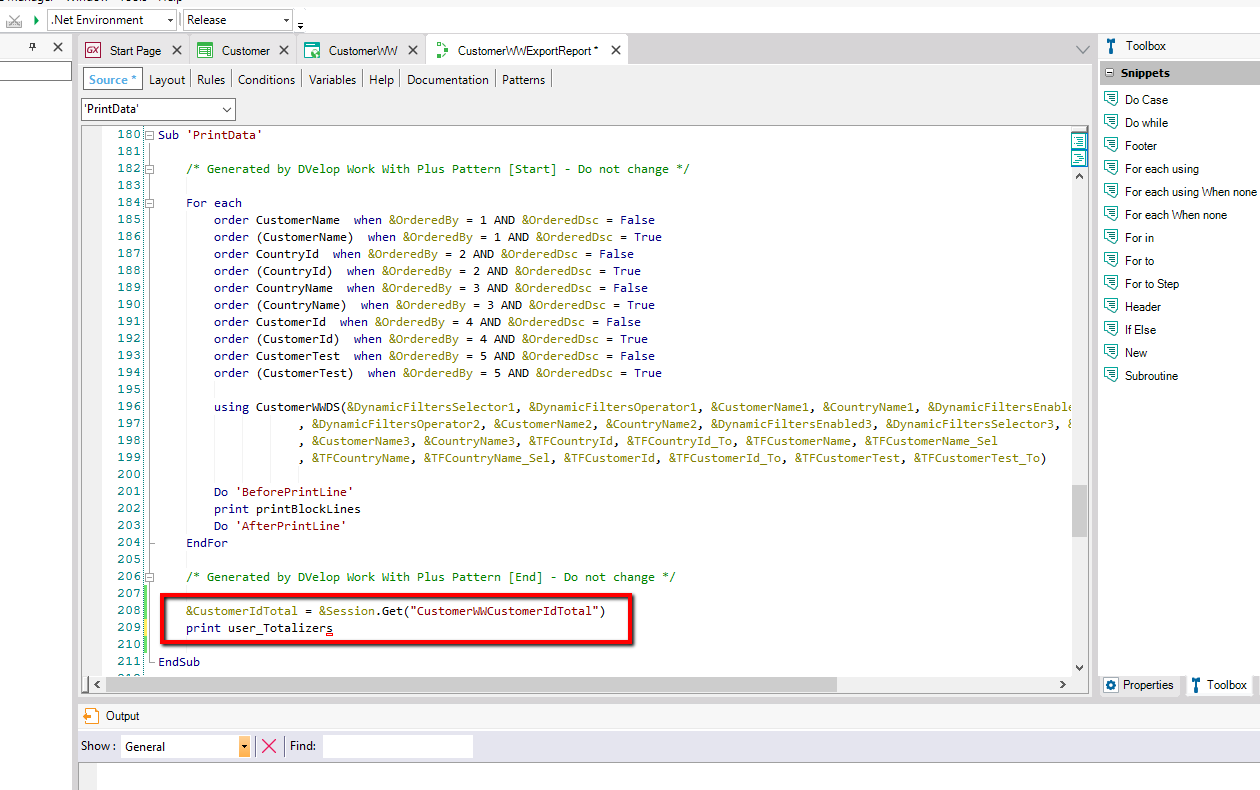
GeneXus IDE source editor for the CustomerWWExportReport procedure's PrintData sub shows a For each loop with multiple order clauses (CustomerName, CountryId, CountryName, CustomerId, CustomerTest) over CustomerWWDS, followed by BeforePrintLine, printBlockLines, and AfterPrintLine calls; a red rectangle highlights the lines &CustomerIdTotal = &Session.Get("CustomerWWCustomerIdTotal") and print user_Totalizers near EndSub.

For Excel, it's simpler than PDF, you only need to add the following code at the end of "WriteData":

&ExcelDocument.Cells(&CellRow, &FirstColumn + &VisibleColumnCount).Text = &Session.Get("CustomerWWCustomerIdTotal")
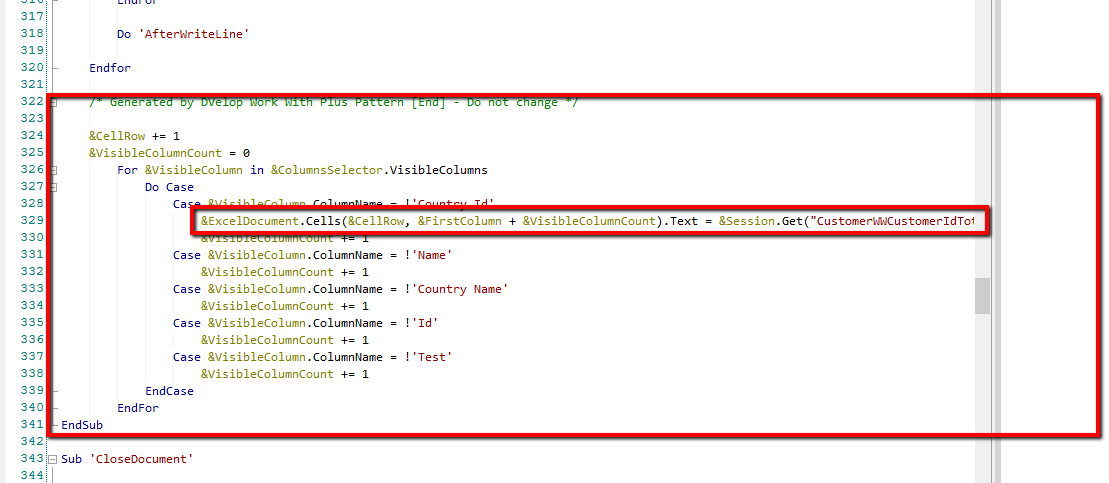
GeneXus source code editor shows a For &VisibleColumn in &ColumnsSelector.VisibleColumns loop with a Do Case matching column names like Country Id, Name, Country Name, Id, and Test; a red rectangle highlights the block including the line &ExcelDocument.Cells(&CellRow, &FirstColumn + &VisibleColumnCount).Text = &Session.Get("CustomerWWCustomerIdTot...") used to export the totalizer value to Excel.

Totalizers was implemented in WorkWithPlus for Web 14 Upgrade # 2.