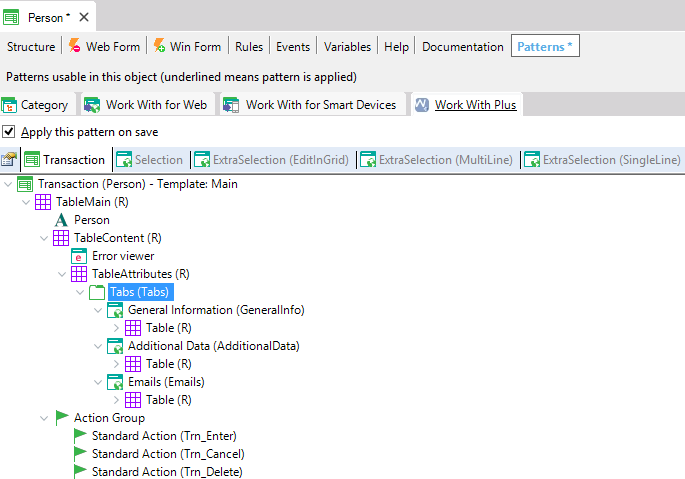
Tabs Node

The Person transaction pattern structure tree shows the Tabs (Tabs) node selected and expanded, revealing three tabs, General Information (GeneralInfo), Additional Data (AdditionalData), and Emails, each containing a Table (R) node.

Tabs node has the following properties:

Category Property  
General Properties Control Name The Properties panel for the "tabs: VerticalTabs (Tabs)" node shows Control name Tabs and Type set to VerticalTabs, with Location in father container settings: Cell Width 100% at all four breakpoints (Extra Small, Small, Medium, Large), Visible True at each, and Align set to Left.
Theme Class
Type
Location in father table Cell Width (Extra Small)
Cell Width (Small)
Cell Width (Medium)
Cell Width (Large)
Visible (Extra Small)
Visible (Small)
Visible (Medium)
Visible (Large)
Cell Control Name
Cell Theme Class
Align
Start Col / Fst Avail
Merge With Previous Cell

General Properties:

Control Name:

Tabs control's name. This property is required in order to identify it in the form.


Theme class:

Tabs controls' theme class. Represents the theme class that will be assigned to Tabs control.


If you want to read information about the Location in father table properties, follow this link: Location in father table

If you want to read more information about Tabs functionality, follow this link: Tabs Control


Type

Puedes elegir  tres posibles valores:

  • Tabs
    A horizontal tab control renders two tabs, General Information (active, underlined in blue) and Person (inactive, gray), with Id and Description fields displayed below the active tab's content area.
  • Wizard
    A wizard-style step indicator shows step 1, General Information, as an active blue circle connected by a line to step 2, Person, shown as an inactive gray circle; Id and Description fields appear below for the current step.
  • VerticalTabs
    A vertical list-style tab control renders General Information (active, highlighted with a blue left border) above Person (inactive, gray) in a left-hand column, with Id and Description fields shown in the content area to the right.