This section explains the steps needed so that when the page loads, the expanded information of a record is already displayed.
First, you need to have a Web Panel with the 'Expanded info in Grid' configured:
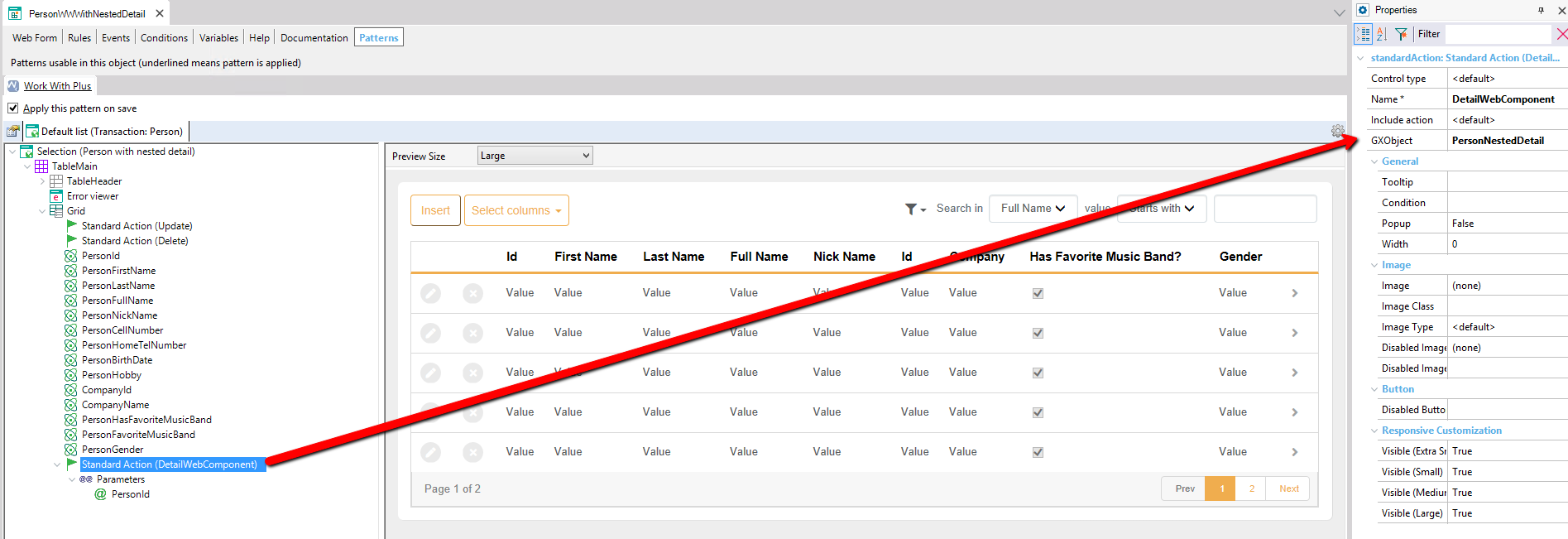
This is explained in the section How to: Create a grid with expanded information (Plain) and How to: Create a grid with expanded information (Grid)
Then, in Start Event you need to load the Web Component, with the following code:
    If &HTTPRequest.Method = HttpMethod.Get
        Grid_DWC.Object = <WebComponent>.Create(<ParameterValues>)
    Endif
Finally, in Grid.Load Event at the bottom of the code generated by WorkWithPlus add the following code:
    &DetailWebComponent.ColumnClass = !'WWIconActionColumn WCD_ActionColumn'
    If &HTTPRequest.Method = HttpMethod.Get and ( <CONDITION> )
        &DetailWebComponent.ColumnClass += !' WCD_Opened'
    EndIf
<CONDITION> is the condition that will define which row of the grid will be expanded.
|