Display messages next to field in Web Panels

The possibility to display the validation messages associated to required variables (variables with the property 'Is required' true) next to the field, like it is displayed in the transactions automatically by GeneXus was added.

In order to do this, the property 'Validation Message Display' within WorkWithPlus Settings -> Template Node has two new values: 'One at a time (on the field)' and 'All at once (on the field)'.

Sample of 'One at a time (on the field)'
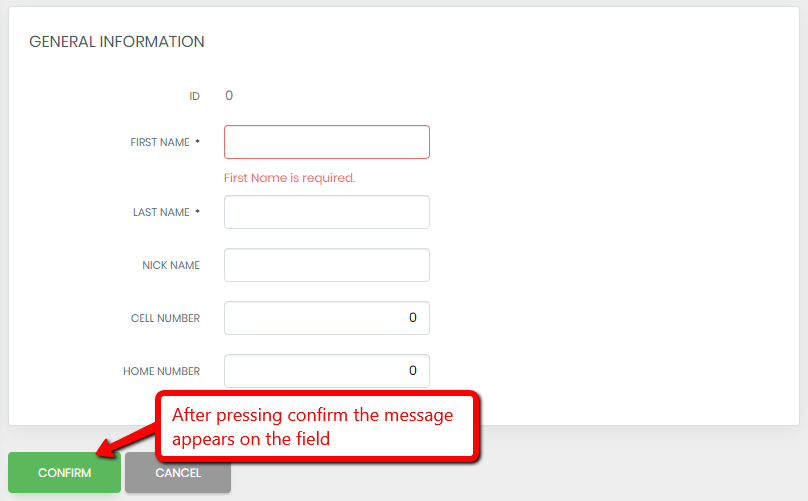
A 'General Information' form shows the First Name field outlined in red with the message "First Name is required." beneath it, while Last Name, Nick Name, Cell Number, and Home Number remain unmarked; an arrow from the Confirm button carries the note "After pressing confirm the message appears on the field".

Sample of 'All at once (on the field)'
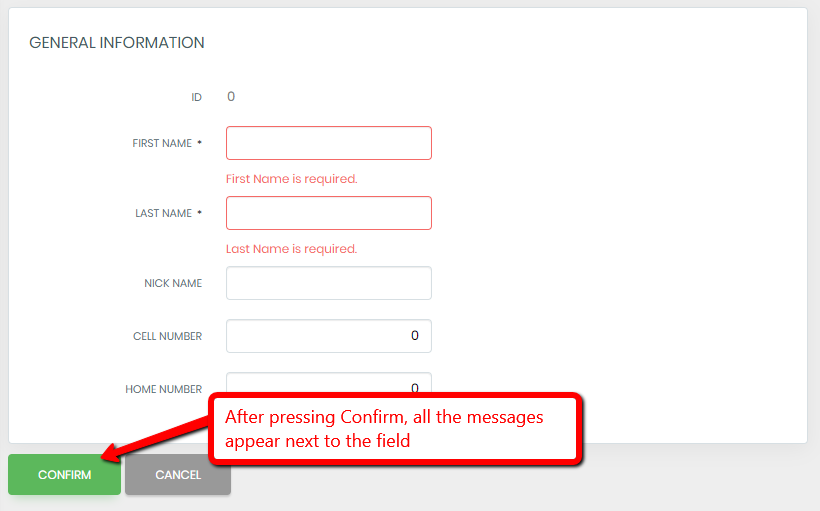
A 'General Information' form shows First Name and Last Name fields outlined in red with validation messages "First Name is required." and "Last Name is required." beneath them; an arrow from the green Confirm button carries the note "After pressing Confirm, all the messages appear next to the field".