Fixed Values in DVelop Combo

The 'DVelop Combo' User Control allows you to define fixed values to display on it, in a very simple way. In order to do this, set the property 'Data source from' of the attribute/variable to 'Fixed values' and then insert each value and description in the property 'Values' of the field.
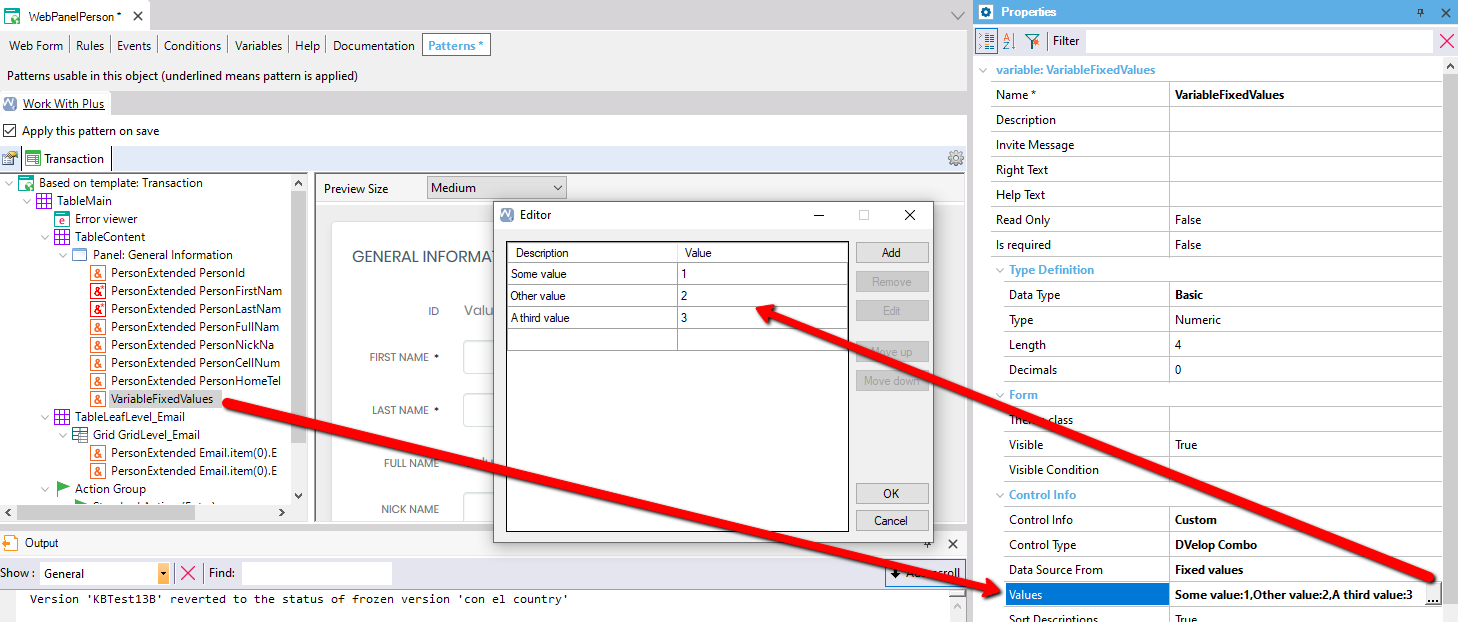
The WebPanelPerson Transaction pattern editor, Patterns tab, shows the object tree with the VariableFixedValues node selected under Panel: General Information; a red arrow points to an open Editor dialog listing Description/Value rows 'Some value'=1, 'Other value'=2, 'A third value'=3, with Add, Remove, Edit, Move up, Move down, OK, and Cancel buttons, illustrating how these fixed values populate the Values property (Some value:1,Other value:2,A third value:3) shown in the Properties panel on the right for a Numeric variable using control type DVelop Combo.